If you have a few confidential files, and you want to keep its privacy, you can use the gpg package (GNU Privacy Guard) which is a version of PGP (Pretty Good Privacy) distributed under GPL license. This package almost have been included on every Linux distro. It offers two modes of encryption: asymmetric (public key) and symmetric.
Imagine that you have a very important specification of new project you have worked on, saved in the file named PROJECT.pdf, and you want to hide it from unauthorised access. In order to do thus, use:
$ gpg --output Cipher --symmetric --cipher-algo TWOFISH PROJECT.pdf
gpg will prompt you for a password/passphrase that will be the key for securing your data. Type it and confirm. It should be as complicated as possible, but also easy to remember.
Let's walk through the command we entered. We told gpg to encrypt the PROJECT.pdf file using symmetric encryptin (--symmetric) and the TWOFISH cipher algorithm (--cipher-algo TWOFISH). Without the last option, gpg would use the default cipher, CAST5. the output will be stored in Cipher file (--output Cipher). You should be aware that, in case the given output file exists, the program will ask if it should be overwritten.
If you want to decrypt your file, use:
$ gpg --output PROJECT.pdf --decrypt Cipher
The --decrypt Cipher option means decrypt the file named Cipher whereas --output PROJECT.pdf specifies the ouput file name. gpg will automatically recognise the cipher that was used and will prompt for a password.
Reference:
1.Hakin9 Magazine, January 2005. www.hakin9.org.
2.GnuPG 1.4.9 Manual.
Showing posts with label Software. Show all posts
Showing posts with label Software. Show all posts
Wednesday, 29 April 2009

Monday, 20 April 2009
Rosetta Stone V3.2 On Linux with Wine
There is no version of Rosetta Stone that is produced for Linux, only Windows and MacOS, i think its developer scared of its possibility to get a market :). But don't be disappointed with this fact, today we can use Rosetta Stone V3.2 on linux although by using Wine. No problems when installling it on linux, and no error message :). Its run smoothly and fine.

I'll try to review it a little to someone who don't know what a creature this Rosetta Stone.....
Rosetta Stone is a software used for making easy learning on mastering a certain language. Many language being covered by this software; English, French, Spanish, Japanese, Chinese, Russian, Arabian, etc. Each language oftenly packed to three level. We must buy each level to use this software. This software has a speech processing in it so every user of it can learn native speak of certain language.
Below screenshot when I use Rosetta Stone with Spanish language pack.

Try this software, you'll not regret :).

I'll try to review it a little to someone who don't know what a creature this Rosetta Stone.....
Rosetta Stone is a software used for making easy learning on mastering a certain language. Many language being covered by this software; English, French, Spanish, Japanese, Chinese, Russian, Arabian, etc. Each language oftenly packed to three level. We must buy each level to use this software. This software has a speech processing in it so every user of it can learn native speak of certain language.
Below screenshot when I use Rosetta Stone with Spanish language pack.

Try this software, you'll not regret :).
Comix, software makes comic reading easier
For every one who loves reading comic, can use this Comix
"Comix is an image viewer specifically designed to handle comic books. It reads ZIP, RAR, and tar archives (also gzip or bzip2 compressed) as well as plain image files."

Here a screenshot when comix open Naruto comic Series 1

It has many view mode; fit screen mode, fit width mode, fit height mode, etc.
Just an information, I have each series of Naruto comic electronic edition until this day (Bleach too...). If you wanna have it call us....:), we give you free....:)
Yours sincerely,
Juan Rio Sipayung
"Comix is an image viewer specifically designed to handle comic books. It reads ZIP, RAR, and tar archives (also gzip or bzip2 compressed) as well as plain image files."

Here a screenshot when comix open Naruto comic Series 1

It has many view mode; fit screen mode, fit width mode, fit height mode, etc.
Just an information, I have each series of Naruto comic electronic edition until this day (Bleach too...). If you wanna have it call us....:), we give you free....:)
Yours sincerely,
Juan Rio Sipayung
Monday, 13 April 2009
Running Mavis Beacon Teaches Typing Deluxe 17 on Wine
Finally after a long time learning typing with Mavis Beacon 15, on Windows XP, through Virtual Box, i must take a stop. Doesn't mean i'm stop to learn but stop using it with Virtual Machine, because Mavis Beacon 17 (there is version 20 the newer version, but i think version 17 is much better than 20) now can be running on Wine.
But there are 2 problems after installing this mavis beacon:
1. no sound of "mavis music", "background music", and "mavis voiceover" when typing.
2. Alphanumeric being typed looks weird than the example being showed (look at the two picture below)
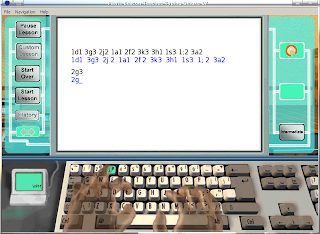

For problem no.1, Actually, I don't know the solution until now :(. For Problem no.2, it can be solved by copying font file from Windows XP installation to "~/.wine/drive_c/windows/Fonts" (depends on path of your wine installation). According to my own test, this Mavis Beacon need 2 type font i.e times.ttf and comic.ttf (or cour.ttf). Both can be obtained from "C:\Windows\Fonts" default Windows XP installation folder. After finish copying the file, rerunning Mavis. Then.....
Voila...., its look normal now....:)

But there are 2 problems after installing this mavis beacon:
1. no sound of "mavis music", "background music", and "mavis voiceover" when typing.
2. Alphanumeric being typed looks weird than the example being showed (look at the two picture below)


For problem no.1, Actually, I don't know the solution until now :(. For Problem no.2, it can be solved by copying font file from Windows XP installation to "~/.wine/drive_c/windows/Fonts" (depends on path of your wine installation). According to my own test, this Mavis Beacon need 2 type font i.e times.ttf and comic.ttf (or cour.ttf). Both can be obtained from "C:\Windows\Fonts" default Windows XP installation folder. After finish copying the file, rerunning Mavis. Then.....
Voila...., its look normal now....:)

Wednesday, 8 April 2009
Playing Nintendo64 games in PC
Almost every consoles game have their emulators (there are emulators for Playstation 2, but still unaccurate, Playstation 3 definitely maybe not have been created). In this time I'll introduce you with Nintendo64 emulator Mupen64Plus (Maybe you asking on your mind why I'm not using other emulators?.., well, honestly, I only have this emulator installed on my PC :), and also have the Rom :) ).
Mupen64Plus is a plugin-based N64 emulator for Linux which is capable of accurately playing many games. Included are four MIPS R4300 CPU emulators, with dynamic recompilers for 32-bit x86 and 64-bit amd64 systems, and necessary plugins for audio, graphical rendering (RDP), signal co-processor (RSP), and input. There are 3 OpenGL video plugins included: glN64, RiceVideoLinux, and Glide64.
The most current documentation can be found at the project's homepage:
http://code.google.com/p/mupen64plus
here a screenshot when mupen64plus playing Paper Mario

for more screenshot here
There is a part i dislike, its input configuration reverse for right and left arrow, so the setting for right and left arrow must be reversed in joystick....., its annoying. I hope its programmers fix it..
Happy Happy-Ing
Juan Rio Sipayung
Mupen64Plus is a plugin-based N64 emulator for Linux which is capable of accurately playing many games. Included are four MIPS R4300 CPU emulators, with dynamic recompilers for 32-bit x86 and 64-bit amd64 systems, and necessary plugins for audio, graphical rendering (RDP), signal co-processor (RSP), and input. There are 3 OpenGL video plugins included: glN64, RiceVideoLinux, and Glide64.
The most current documentation can be found at the project's homepage:
http://code.google.com/p/mupen64plus
here a screenshot when mupen64plus playing Paper Mario

for more screenshot here
There is a part i dislike, its input configuration reverse for right and left arrow, so the setting for right and left arrow must be reversed in joystick....., its annoying. I hope its programmers fix it..
Happy Happy-Ing
Juan Rio Sipayung
Subscribe to:
Posts (Atom)
Free Software Sticker Book
